It was real easy to aplly for a 1x1 call sign for the 2010 Field Day. I was surprised at how easy and how few hoops there were to get the call K4Y. All you have to due is go to the ARRL for all the rules and regulations. You apply and check avaliability at http://www.1x1callsigns.org/ . You have five different Coordinators to choose from. The application is done online and in a couple of days you get your approval.
ARRL
1x1callsigns.org
Friday, February 12, 2010

Wednesday, February 3, 2010
Field Day 2010
It is that time of year that all of us Hams start thinking not about Spring, but start planning Field Day! I am helping plan Henderson County ARES activate the EM EOC. This will be a fun undertaking, any local help is needed. For more information:
http://www.arrl.org/?artid=9414
http://www.arrl.org/?artid=9414
2010 Field Day Packets Now Available (Feb 2, 2010) -- It’s that time of year again -- time to start gearing up for ARRL Field Day, June 26-27, 2010! ARRL’s flagship operating event -- always held the fourth full weekend in June -- brings together new and experienced hams for 24 hours of operating fun. Field Day packets are now available for download and include the complete rules (including changes for 2010), as well as other reference items such as forms, ARRL Section abbreviation list, entry submission instructions, a Frequently Asked Questions section, guidelines for getting bonus points, instructions for GOTA stations, a kit to publicize your event with the local press and more.
Wednesday, January 27, 2010
Asterisk Amateur Radio Network
Asterisk Amateur Radio Network, AARN, is a possible branch for the HSMM. Asterisk is based on the ASTERISK PBX software. It has the capability to interconnect communications from and between Public Switched Telephone Network (PSTN), Internet Telephone (VoIP – SIP, IAX2) and Radio Communications Via Analog and Digital on HF, VHF, UHF, SHF. Using HSMM and Asterisk, multiple services can be interconnected for the served agencies. I will be looking into this for the future.
http://asteriskradio.net/wp/aarn/
http://asteriskradio.net/wp/aarn/
Thursday, December 31, 2009
Winlink 2000 RMS Station
The RMS Station is up and running using Sound card technology. I am running a Compaq computer with XP, running AGWPE and WL2K RMS. The setup for these programs was real easy KC2RLM has a good tutorial for the setup. The sound card interface is a Rigblaster Nomic. The Nomic performs very good and is easy to setup. The 2m radio is a Radio Shack HTX-242. This radio is an older 2m radio but does a really good job with packet. You can still find these for sale on Ebay and other places. The antenna is a Diamond CP22E at about 35 Feet. This antenna is a high-gain monoband antenna made from heavy-duty aluminum construction. It has 6.5db gain and rated to 200 watts. If you have a PSK31 or any other digital mode running, you can also run Winlink2000.


Nomic

CP22E
Friday, December 4, 2009
Dad's old Ham Station
Here is a picture of my Dad's N4QFI (SK) Ham Station sometime in the 1970's. I cut my Ham teeth during this time. There is a lot of different items in the picture, but this was probably typical for that time. I see a Drake 2-A, E.F.Johnson Viking II, ARC5, Heathkit DX-40. These are the ones I recognize. I have some good memories of listening to shortwave on a National NC-88 while he worked CW.


Wednesday, November 25, 2009
The next step for HSMM
The next step for the HSMM testing will be using a VHF bridge for email. This will be accomplished with WINLINK2000. Winlink is a worldwide radio messaging system that uses the Internet where possible. I will build a RMS Packet Gateway and a mobile unit. The mobile unit will be connected to the 802.11 system which then could connect to several remote linked 802.11 nodes. I will show the build here.
www.winlink.org/
www.winlink.org/
Monday, November 16, 2009
HSMM First Test a Success!!!!!
Today we tested the first two HSMM Radios in Henderson County. The people involved in this Historic Day were KI4GWN Kimber, the EC for Henderson county, KI4IYS Chris, and myself KC4BQK. This has been a fun and a very good learning experience. Of course we had our problems getting everything setup. There was to much glare on the laptop screens and a few other small problems that always happen in the Mark 1 prototype equipment. One unit was on house power and the other was powered from the truck. We did get everything working at close range and then we went long range, about 3/4 mile. At that distance we had no problems communicating with the equipment. This was done with only 200mW.
Here are a couple of pictures of the test:


Here are a couple of pictures of the test:

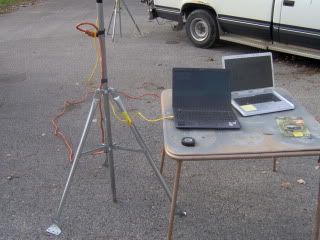
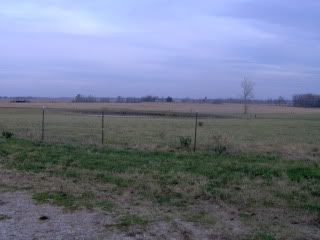
Monday, November 9, 2009
VOIP for HSMM
Speak Freely looks like a very good VoIP program for HSMM. IRLP uses a Voice-Over-IP (VoIP) streaming software called Speak Freely. VoIP is the technology that allows you to send your voice over the Internet. Speak Freely is Open Source under the GNU General Public License. There are two versions of this program Release 7.2 for Windows with Crypto. This is the version that you could have encrypted or private conversations. As Hams, we would need to use the Non-Cryptographic version which has all encryption capability removed. In initial testing this program works very good. It is easy to use and will act just like a push-to-talk radio. This will make it very familiar to Hams.
http://www.speakfreely.org/
http://www.speakfreely.org/
Tuesday, November 3, 2009
HSMM Radio Completed
The first radio is mounted and operational. Now it is time to build more and start setting up the system. My ultimate plan is to have these radios run to a mobile Winlink node and then sent to a RMS. The 802.11 radios would probably work beter at providing infrastructure for the served agency's. We would then use the Winlink RF and Internet for the backbone. Here are a couple of pictures of the radio.


Friday, October 30, 2009
How to Program the WRT54G
Now that the two WRT54G's (one version 4 and one version 8) have had their firmware upgraded to DD-WRT, it is time to make them work together. We have to set the routers up for WDS (Wireless Distribution System) to stay legal with Part 97 ID requirement. If the SSID is your Callsign the station easily satisfies Part 97 ID requirements.
The WRT54G's default address is 192.168.1.1 You need to change this and give each one it's own IP address. For example: The first Router=192.168.1.1 then on your WDS connected router 192.168.1.2, third would be 192.168.1.3 etc. You also need to disable DHCP on all routers except the first one. Set the routers to AP mode and put them on the same Ham channel 2 through 5. Turn off security on both routers. Under Part 97 the transmissions can not be encrypted. Wireless - Wireless Security - Security Mode. Then put the wireless MAC address of each router into the table of the other router, and select LAN for the type. Wireless - WDS. There is no need to enable Lazy WDS or WDS subnet on either router. Turn off the firewall on the routers. Security - Firewall - Firewall Protection. And do not forget to turn up the Tx power. These are the basic steps to get the routers talking together.
The WRT54G's default address is 192.168.1.1 You need to change this and give each one it's own IP address. For example: The first Router=192.168.1.1 then on your WDS connected router 192.168.1.2, third would be 192.168.1.3 etc. You also need to disable DHCP on all routers except the first one. Set the routers to AP mode and put them on the same Ham channel 2 through 5. Turn off security on both routers. Under Part 97 the transmissions can not be encrypted. Wireless - Wireless Security - Security Mode. Then put the wireless MAC address of each router into the table of the other router, and select LAN for the type. Wireless - WDS. There is no need to enable Lazy WDS or WDS subnet on either router. Turn off the firewall on the routers. Security - Firewall - Firewall Protection. And do not forget to turn up the Tx power. These are the basic steps to get the routers talking together.
Subscribe to:
Posts (Atom)