Here is some information and some pictures of different quality PSK31 signals as they appear in your waterfall. You will not be able to see your trace, but you can ask the person you are talking to how yours looks. This should also help you to help others in how their traces look. It is important to have as clean of signal as you can. You must also be careful not to transmit computer sounds.
Look at the traces between the two red lines.
This first one is of a very good signal:
The second one is the typical signal you will see:
This is the one you do not want:
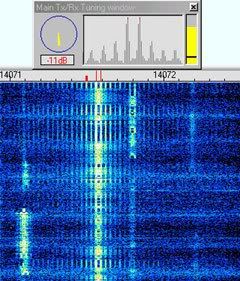
Here are some tips for a clean signal:
1. Tune the rig for normal output on CW.
2. Change to the appropriate sideband setting (USB for PSK31 is standard)
3. Turn off the speech processor and leave it off
4. Set the audio control of the rig as you would for normal SSB operation
5. Set the PSK software to Transmit, with no data being transmitted.
6. Adjust the audio output from the soundcard so that the RF power output from the rig is no more than 25% of the cw output. (e.g. 25 watts for a 100 watt rig) There should be no ALC indication at this power level.
Pictures from and more info:
http://www.rsq-info.net/Station-Setup-Checklist.html
Henderson KY Winlink Gateway
Henderson Kentucky Winlink 2000 Gateway 145.010
KC4BQK-10 RMS
KC4BQK-2 BPQ32 NODE
KC4BQK-1 BBS
KC4BQK-10 RMS
KC4BQK-2 BPQ32 NODE
KC4BQK-1 BBS
Monday, April 19, 2010
Tuesday, April 13, 2010
PSKMeter
This is an interesting little kit for PSK31 or PSK63, a PSKMeter. The kit is from KF6VSG and he states on his web site:
"Our solution has been to develop a microprocessor-based RF signal sampler that periodically checks your RF output, computes its IMD locally, and automatically sets the sound card's audio level to provide the highest RF output with minimum distortion."I may have to purchase this kit and try it out. It looks simple to build and if it preforms as stated would be a very good tool for PSK31. It runs on Windows 95 and newer.
Check it out at:
Monday, April 5, 2010
Remote computer access for Winlink RMS Station
I have been thinking about having the ability to access my Winlink RMS station from any computer connected to the internet. It would be nice to be able to shut down the system or to check on it from work. This has led me to do some research on software for this. In the Ham spirit, I was looking for something for free. It is not that I am a "cheap" Ham, but a frugal one. The remote control is done over the internet with a web browser. I have installed and used this program, it preforms quite well. It is easy and designed well. The interface is very usefull. I now can control my RMS from any computer connected to the internet. I can restart it or terminate the RMS program if a problem occurred. I recommend this software.
https://secure.logmein.com/US/home.aspx
Tuesday, March 30, 2010
Monday, March 29, 2010
Fldigi and Flarq a Digital Mode for Traffic Handling NBEMS
Fldigi is a nice program for PSK31 and various other digital modes. It is simple to use and has several advantages going for it for traffic handling. I normally use Digipan for HF digital, but I have been playing with this one for a few days now. I like this software with an eye towards traffic handling. The traffic handling comes into play with Flarq. Flarq provides handshaking on top of Fldigi to provide 100% assurance the message got through. It will also send binary files, which is where I would like to try using Qforms for Radiogram traffic. Flwrap is also another piece of Fldigi that could be very usefull. It would enable you to send a bulletin, weather report, situation updates or data to one or more stations at a time with 100% accuracy. Nets can be conducted using fldigi alone, and net control can suggest that two stations move to an adjacent frequency, have one beacon, the other connect, and then pass traffic using the error-free ARQ protocol provided by flarq. NBEMS is the combined use of Flarq, Fldigi, a Single Sideband Transceiver and the appropriate antenna system. I have included some great help sites.
http://w1hkj.com/NBEMS/
http://www.w1hkj.com/
http://w1hkj.com/FldigiHelp/index.html
http://w1hkj.com/FlarqHelpFiles/flarq.html
http://w1hkj.com/NBEMS/
http://www.w1hkj.com/
http://w1hkj.com/FldigiHelp/index.html
http://w1hkj.com/FlarqHelpFiles/flarq.html
Wednesday, March 24, 2010
SCI-6 PC Sound Card Interface Kit
I recently purchased a SCI-6 PC Sound Card Interface Kit from Unified Microsystems. Gary Sutcliffe, W9XT, makes a really good kit. It was well designed and inexpensive kit. The kit sells for $24.95 plus $5.50 shipping. I have built several sound card interfaces, but price wise this kit is hard to beat. This is because finding the needed parts is getting expensive and hard to find locally. If you have any soldering skills, this kit is fun and quick to build. It takes less than an evening to build with the great instructions that come with it. If you follow the guide and use good building techniques it will work the first time you hook it up. The only thing you need with this kit is the cables for your radio. Order this kit and get started with digital communications.
http://www.unifiedmicro.com/sci6.htm
Monday, March 22, 2010
Mobile Winlink Up and Running
I now have the mobile Winlink system up and running. The final tests went very well. I can connect to my RMS or the one in Owensboro K4HY-12. The mobile consists of a Yaesu FT-1802m and a SCI-6 PC Sound Card Interface. I will post a wright up on this unit. Now I can start testing the complete system with the HSMM radios with it. With this system, I can now pull up somewhere and supply a link for Email for any of our served agency's. This is good for that "Last Mile" communications. With a small 2m beam on a 10 foot pole, I could increase the range of the mobile unit. Now it is time to display the system for the public and other Hams.
Saturday, March 20, 2010
"Radio Hams" Film (Pete Smith Specialty)
Here is a good movie about Ham Radio from 1939. Just thought I would share it.
Thursday, March 18, 2010
Airlink Express for PSK31
I recently ran across another PSK31 software package. I have always preferred Digipan, and Airlink Express resembles Digipan. It sets up easy and works close enough like digipan that I had a very small learning curve to use it. This software is compatible with Microsoft Windows XP, Microsoft Windows Vista, and Microsoft Windows 7. It offers PSK, MFSK and RTTY digital modes with logging and macro capabilities. This software is from Alex Krist, KR1ST and he did good with this one. Download the software and make some digital contacts tonight!
These are just some of the features available in Airlink Express:
■Automatic Multi Channel Display
■Support for Multiple Soundcards
■PSK31, PSK63, PSK125, PSK250, MFSK and RTTY
■Radio Control (CAT)
■Center Bandpass Tuning
■True FSK Keying
■Macros
■Bandpass Filters
■Logging with ADIF Import and Export
■Replay Last 60, 30, or 15 Seconds
Here is a screen shot
http://www.airlinkexpress.org/index.html
These are just some of the features available in Airlink Express:
■Automatic Multi Channel Display
■Support for Multiple Soundcards
■PSK31, PSK63, PSK125, PSK250, MFSK and RTTY
■Radio Control (CAT)
■Center Bandpass Tuning
■True FSK Keying
■Macros
■Bandpass Filters
■Logging with ADIF Import and Export
■Replay Last 60, 30, or 15 Seconds
Here is a screen shot
http://www.airlinkexpress.org/index.html
Tuesday, March 16, 2010
QForms for Winlink
Qforms is a great program for Winlink Radiogram messages. QForms supports ICS, Radiogram, and Simple format messages. QForms allows entry of text into an electronic form to create a message, which is then saved in an XML format. The XML file is then sent to another station that is also running QForms where it can be opened, displayed and printed. Optionally, a text version of the message can be created, saved and sent to a remote station. The text format can not be re-opened by QForms other than as a simple text file. This is an easy way to send properly formated Radiograms. Checkout the download page at The Active Ham.
http://www.activeham.com/pmwiki.php?n=Main.HomePage
Subscribe to:
Posts (Atom)


